Unlocking creative potential by teaching coding
This post looks at why it is valuable to teach young people to code, and how you might get started teaching your children at home. I was encouraged to write this post when speaking to a colleague about how they might get their kids into programming. Note, the specific learning path I go into here is aimed at those aged around 9 and above.
In a rapidly digitizing world, it is hard to overstate the importance of digital skills. We all interact with technology every day, but a key skill (and skill shortage) is understanding the language of technology — code. In my time working, I’ve had countless colleagues and friends discuss the desire to be better equipped for using software. Usually, this is for a specific purpose, for example: being able to write a ‘script’ to automate a repetitive task; to enhance/modify existing tools; or, perhaps most commonly, to get more into data science. There are many ways adults can learn to code, from learning from peers to free online resources (e.g. Code Academy)). In this post, I want to explore how children and young people might begin their learning journey with the support of adults and volunteers.
Why Young People Should Learn to Code?
It is clear there is no turning back from the digital revolution we are living through and each day we become more reliant (for better and worse) on digital technology: from managing critical national infrastructure to getting dopamine hits when scrolling. Now, children are growing up as ‘digital natives’, where technology is understood to be a part of daily life, as opposed to an optional extra.
Coding simply means writing lines of code in a language that a computer can understand and can then translate into instructions, to do some (optionally meaningful) output. To date this has largely been the realm of computer scientists, software developers, and engineers. However, this is now shifting with jobs advertised with knowledge of Python as a bonus cropping up more frequently than a few years ago. It may only be a matter of time where this is the expectation akin to knowing Microsoft Office.
Learning a specific language today might not be the same tool used in the future when young people enter the job market, with the rise of new programming languages and AI. The question arises of skills becoming ‘out of date’? However, I believe the ability to ‘know language X’ developed from learning to code, especially at this early stage, represents a small fraction of the value. The real value is being able to think like a programmer.
Below are some key reasons I think young people should learn to code:
-
Problem-solving skills: Coding teaches logical thinking and problem-solving techniques. It requires breaking down complex problems into smaller, manageable parts a valuable and very transferable skill.
-
Creativity: Coding allows young people to express their creativity by building websites, games, or apps. It’s a medium for innovation where they can bring their ideas to life.
- Empowerment: Understanding how technology works gives young people a sense of empowerment and control over the digital tools they use daily. Instead of simply being consumers, they become creators.
-
Job opportunities: Programming skills are in high demand across various industries from creative industries to engineering.
- Collaboration: Perhaps surprisingly, writing code often involves working in teams and communicating the why behind your work. Learning to code helps young people develop collaboration and communication skills.
Options for getting involved
If it sounds like now might be the time to get your children involved in coding, read on.
Below is a guide for children aged around 9 and older, and is based largely on the Code Club curriculum. Code Club has significantly reduced the barrier to entry thanks to the user-friendly (and free) tools available online which can be used straight from a browser. The only things needed to get started are a computer and an internet connection (although there are options to work offline).
Below are two ways your child might get involved:
- Joining a structured code club
- Working on projects at home
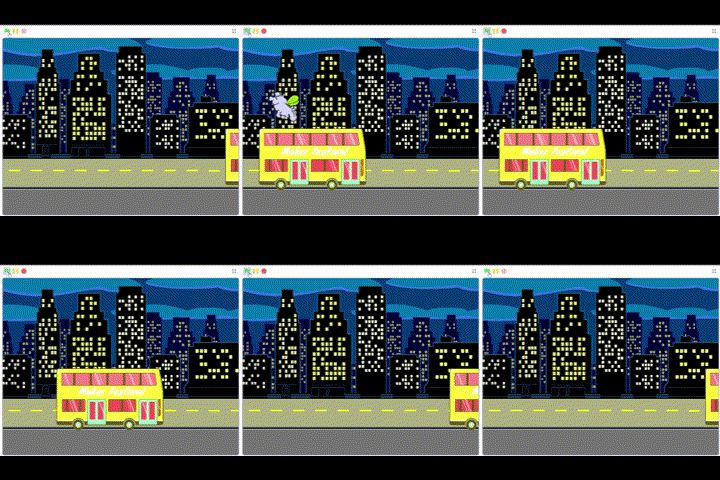
An example animation I created is below in Scratch, based on the Catch the Bus project, which comes with detailed step-by-step instructions. This is one of the early projects for getting started in Scratch and for an adult would take no more than 15 minutes to complete from start to finish.
Code Club Aotearoa
Code Club Aotearoa is the New Zealand branch of the Code Club movement and is a nationwide network of volunteer-led coding clubs for kids aged 9 and above. It is founded on the belief that every child should have the opportunity to learn to code, regardless of their background or resources.
These clubs, often hosted in schools, libraries, or community centers, offer a fun and interactive environment where children can explore the world of programming through projects and challenges. The curriculum is designed to be engaging and accessible and supports kids in learning coding languages like Scratch, HTML/CSS, and Python while developing computational thinking and problem-solving skills. The Code Club Projects have different learning paths that support a natural progression for learning to code. At the code club I volunteer at Ao Tawhiti in Christchurch, we extend the Scratch learning path to interact with the outside world using the micro:bit and Lego Mindstorm EV3 kits hardware. This hardware also runs using Scratch making progression very simple.
Finding a club
I highly recommend getting your kids involved in a Code Club if possible, and this is by far the simplest way to get them engaged in coding and working alongside their friends to build and program together.
Head to ‘Find a Club’ on the Code Club website and search for a club nearby.
Coding at Home
As mentioned above, all you need to get started is a computer and an internet connection. I have split this into two sections: ‘the practicalities’ of how to actually get on the platform and ‘top tips’ sharing some tips on how to get the most from using the code club platform.
The practicalities
The following process is outlined to try and reduce the barrier to getting started, but the reality is that you could use the very accessible Code Club website and be on your way very quickly. Getting started steps:
- Create an account for your child
- Head to the Rasberry Pi Foundation
- You’ll need an email address for this
- This isn’t a required step, but it helps with tracking progress and allows you to save work on projects over multiple sessions.
- Pick a learning path
- Take a look at which path seems right
- I recommend everyone begins with Scratch - it’s a good foundation for the basic concepts and is very interactive. Don’t be fooled by the funky colours, you can learn a lot about programming and build very detailed (and fun) games, etc. using Scratch.
- Choose a learning collection
- Again - I recommend starting with the basics on ‘Introduction to Scratch’
- Choose a project
- The first one is ‘Space Talk’
- Hit ‘Start Project’
- Follow the instructions step by step
- Open up Scratch and get started
- On the second page of each project, you will see the option in the image below to ‘open the starter project’.
- Start Learning
- You now have the instructions and Scratch open and can begin learning.
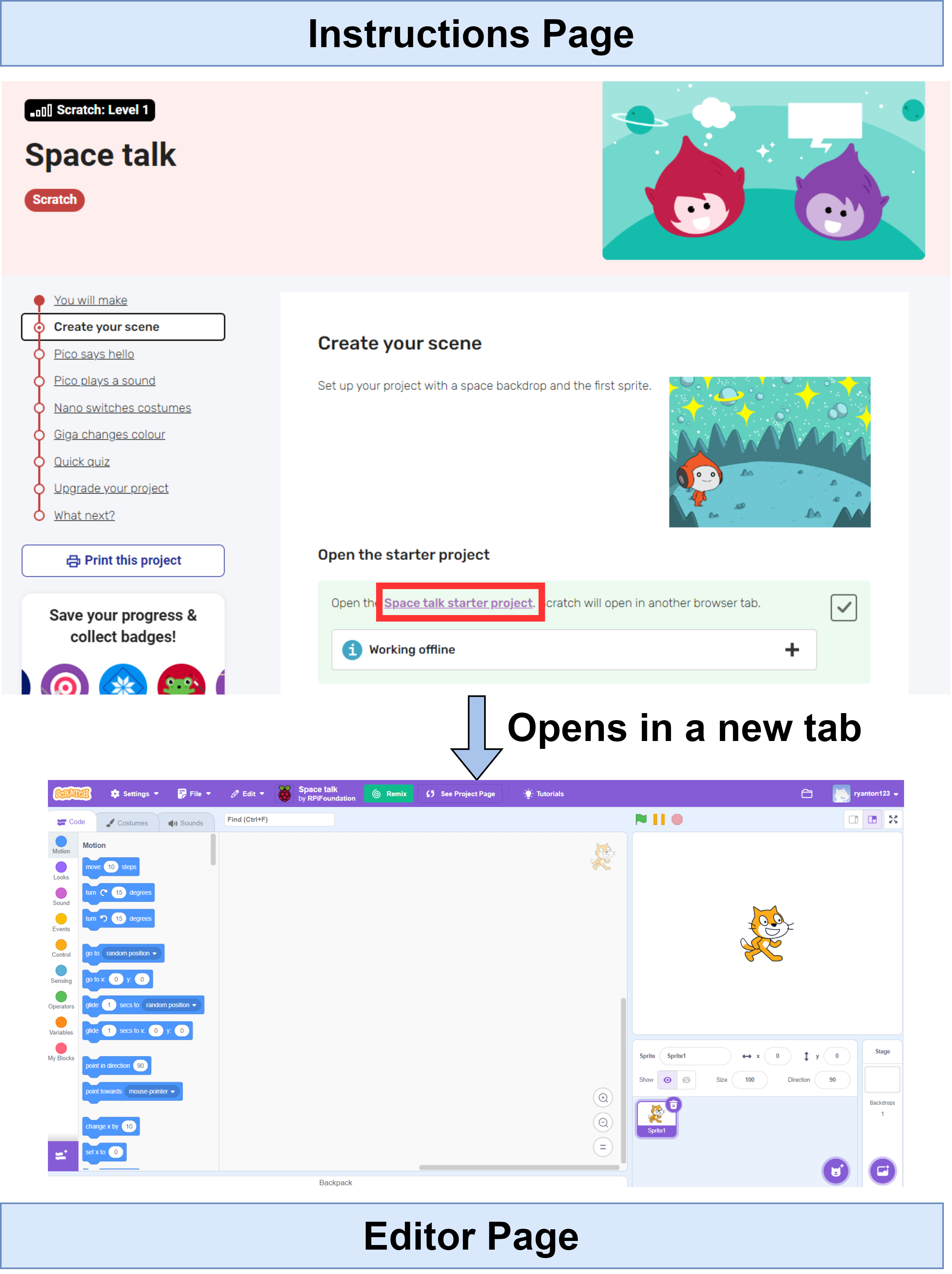
From here, you can keep both tabs open (i.e. the ‘Instructions Page’ and ‘Editor Page’ above) flicking between them to follow instructions and make changes within your Scratch editor as needed. I recommend trying out one or two of the projects, they are short (15 mins max. each) and can let you unblock any teething problems with the tool for your child getting started.
Getting off the ground
Finally, if you’re keen to get your child into learning Scratch, HTML, or Python but are struggling to get a handle on the tooling yourself, drop me an email and I’ll be happy to try to guide you on the right path.
Top Tips
Below are some tips I’ve learned since starting volunteering at a Code Club in Christchurch that might help with the learning journey.
Computers don’t always behave
Computers are sometimes fiddly and can be frustrating (for everyone, but even more so for kids). If your child loses the Scratch page by accident and can’t get it back, they usually need some help. At Code Club I find kids can, for the most part, unblock coding issues by following the tutorials. Often all the need is simple computer issues unblocked. The quicker you can unblock these, the easier the real learning will be.
Check it out
Each project really is just that, a project. Once it’s done, something has been lovingly crafted and created. I find that reviewing the end of each project and asking if you can play the game or start the animation encourages young people. They are excited because you are excited. At this stage, I like asking questions - sometimes because they did something I didn’t know was possible - like ‘How did you make the wings flap?’ to get them to dive into the code and let us both understand it together. Beyond this, setting mini-challenges on particularly interesting projects like ‘Can you make the bus go backwards?’ allows you to extend things beyond the ‘by the book’ tutorial, which I find is motivating for kids.
Keep the momentum - but try not to skip the ‘boring’ parts
Try to get your kids on the computer regularly, perhaps 1-2 hours per week, to reinforce the learning. I have personally been through the Scratch paths and find that each specific project teaches new concepts that progressively build upon the last. For this reason, try not to skip any projects and work through them methodically. Making an account helps with this as you can collect badges and see progression nicely.
Let the creativity flow
The Scratch tutorials do an excellent job of spelling out the step-by-step process to completing each project. While some of the technical components must be followed to make the game/animation/app work effectively, things like colour, artwork, background, etc. can usually all be personalised, without impacting what the program does. I find when students ‘make it their own’ they have much more ownership over the project. The project paths also help with this with the ‘Explore’, ‘Design’ and ‘Invent’ stages of each learning path becoming progressively more independent. The final ‘Invent’ stage lets you create something fully unique to you: from Scratch.
And finally
Learning to program is becoming a near-essential skill today and gives young people a creative outlet that develops their problem-solving skills and empowers them by letting them understand more closely the technology they use. Code Club Aotearoa and the wider Code Club movement is making it easier to teach and learn programming concepts for tamariki here in New Zealand and all over the world. This blog gave tips on how to kick-start and support your child’s coding journey. With a little encouragement and the right resources, teaching kids to code can be a rewarding experience for both parents and children. Happy coding.
Want to volunteer? If you are interested in getting involved in a code club near you as a volunteer, have a look here (for those in New Zealand) or here (for those elsewhere). And even better - if you are based in Christchurch, drop me an email and I can introduce you to one of our clubs.